

What does the HTTP Request block do?
The HTTP Request block lets your bot call any external API mid-conversation — look up data, submit forms, trigger webhooks, or integrate with your own backend systems. Use it to:- Fetch real-time data (order status, product availability, appointment slots)
- Submit collected contact data to your CRM or database
- Trigger webhooks in tools like Zapier, Make, or your own systems
- Post to internal APIs for order creation, ticket submission, etc.
Overview
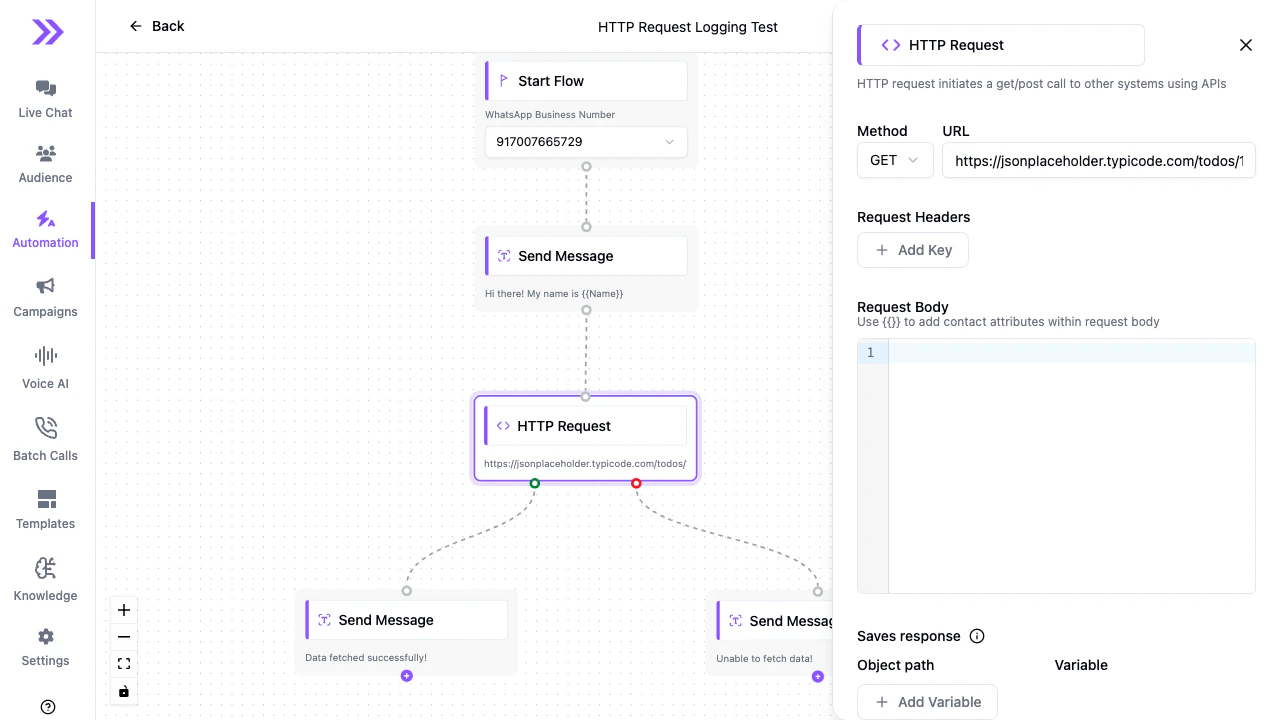
Configuration
Method
Select the HTTP method: GET, POST, PUT, or PATCH. Use GET for data lookups, POST/PUT/PATCH for submitting or updating data.URL
The full URL of the endpoint to call. You can include contact attribute variables in the URL:Request Headers
Add request headers as key-value pairs. Click + Add Key to add a new header row. Common headers:| Key | Example value |
|---|---|
Authorization | Bearer your_api_token |
Content-Type | application/json |
X-Api-Key | your_api_key |
Request Body
For POST/PUT/PATCH requests, enter the request body as JSON. Use{{}} to insert contact attributes collected earlier in the flow:
Save response
Optionally save the API response to a contact or conversation attribute. Click + Add Variable in the Saves response section and provide:- Object path — dot-notation path to the value in the response (e.g.,
data.status) - Variable — the attribute name to save the value into (e.g.,
order_status)
{{order_status}} will be set to "shipped" for use in later blocks.
Error handling
If the HTTP request fails (non-2xx status code or network error), the flow follows the error path (red dot) from the HTTP Request block. Connect a Message block to the error path to show the user a friendly fallback message:Example: Look up order status
Setup:- Use a Collect Input block to ask “What’s your order number?” and save to
order_number. - Add an HTTP Request block:
- Method: GET
- URL:
https://api.yourstore.com/orders/{{order_number}} - Header:
Authorization: Bearer YOUR_TOKEN - Save response: object path
status, variableorder_status
- Add a Message block on the success path: “Your order
{{order_number}}is currently:{{order_status}}.” - Connect an error path with: “Sorry, I couldn’t find that order. Please check the number and try again.”
Tips
- Test with a request bin — use a service like webhook.site to inspect what Swiftsell sends before connecting a real API.
- Keep response paths simple — deeply nested paths (e.g.,
data.orders[0].items[0].status) may not be supported. Design your API to return flat, simple objects where possible. - Handle timeouts — if your API is slow, consider an async pattern (trigger an async job and poll for results in a later flow).
- Always connect both paths — wire up both the success (green) and error (red) output paths so your flow handles every case gracefully.